



Easily move data from SQL Server to Oracle 26ai Free with this step-by-step guide. Learn how to set up a linked server, configure FREEPDB1 and avoid common issues.
I recently had to migrate some data from SQL Server to Oracle 26ai Free edition. I thought I’d see if a linked server would help as it’s often the easiest way to do this, if it works…
That would let me just write INSERT SELECT statements, but SQL Server linked servers to Oracle are known for being a little fiddly and often have issues with some data types, time-related settings, etc.
One thing I hadn’t needed to do in the past was to create a linked server to Oracle 26ai Free, so I thought I should document how I did this so I can find it easily in the future, and it might help someone else.
What is Oracle 26ai Free?
For SQL Server readers, Oracle 26ai Free is basically the current equivalent to SQL Server Express edition. There was an older Oracle Express edition but that’s no longer the one to use.
This latest edition has a few quirks though. When you install it, you get a service named FREE, and you get SYS and SYSTEM users. There is one CDB (Container Database), and one PDB (Pluggable Database) named FREEPDB1.
If you have an application that runs against these servers, you have one of two main choices:
- Create a schema for your application in
FREEPDB1and put all your code and data there. - Create another pluggable database.
In my case, I was using the first method. It’s much easier to move schemas and their contents around on these Oracle systems than it is to move around what SQL Server people think of as databases. There isn’t a simple backup/recovery SQL command like there is in T-SQL, but you can use the expdb utility to export a schema, and the impdb utility to import the schema again.
Installing the OraOLEDB.Oracle Provider
Before you can create the linked server, you need the OLE-DB provider. If you’ve installed Oracle on the same system as the SQL Server system, you’ll already have this. Otherwise, you’ll need to install it.
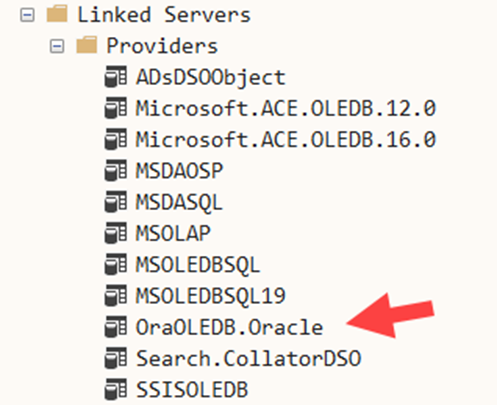
The provider you’ll need is the OraOLEDB.Oracle provider. There was an older Microsoft provider for Oracle but you shouldn’t use that now:
Configuring tnsnames.ora for FREEPDB1
There are two files involved with the database engine listener, and with resolving the location of the listener. The file listener.ora defines the port, address, and service that the listener is associated with.
When SQL Server attempts to connect though, it needs to be able to resolve the service name by using a file called tnsnames.ora. It is generated by the Oracle configuration tools and its location depends upon where you installed Oracle. On my system, that was here: C:\Oracle\dbhomeFree\NETWORK\ADMIN\tnsnames.ora
The name FREE was already defined in there but I needed to add the following to the file:
|
1 2 3 4 5 6 7 8 |
FREEPDB1 = (DESCRIPTION = (ADDRESS = (PROTOCOL = TCP)(HOST = host.docker.internal)(PORT = 1521)) (CONNECT_DATA = (SERVER = DEDICATED) (SERVICE_NAME = FREEPDB1) ) ) |
That allowed the name FREEPDB1 to also be resolvable. There might be another way to change this file, but that worked fine for me.
Step-by-Step Linked Server Setup in SQL Server
Linked Server Security and Authentication Settings
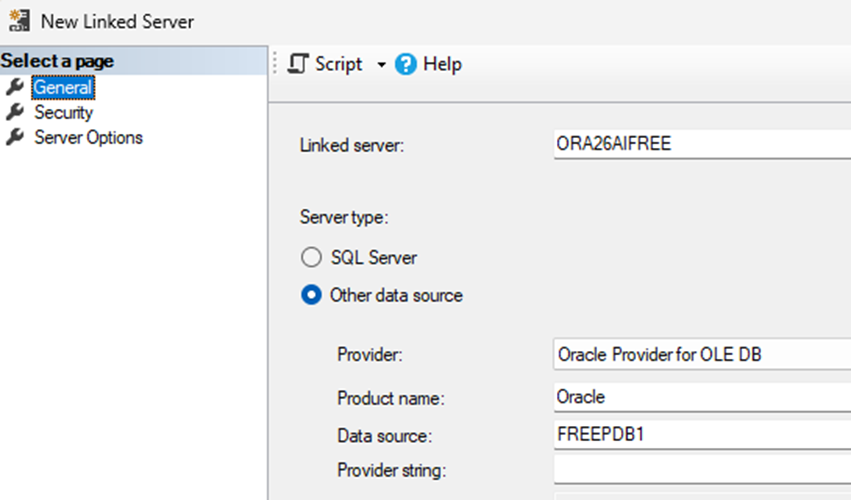
On the General tab of the New Linked Server dialog, I entered ORA26AIFREE as the name of the linked server – however, the name you use is irrelevant. I choose the Oracle Provider for OLEDB that I mentioned before. For the Product name, Oracle is the appropriate value. And for the Data source, you need to put the PDB that you are connecting to. In my case, that was the default user one called FREEPDB1:
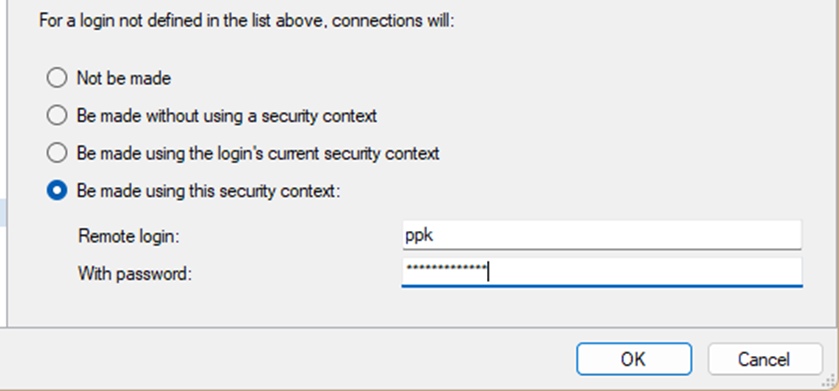
On the Security tab of the dialog, I needed to use a fixed security context. I had no option to flow a context across. So, for Remote login, I entered ppk. That’s the name of the user that the application connects as, and the name of the schema that I was using. I then entered the password:
Server Options: RPC, RPC Out, and Distributed Transactions
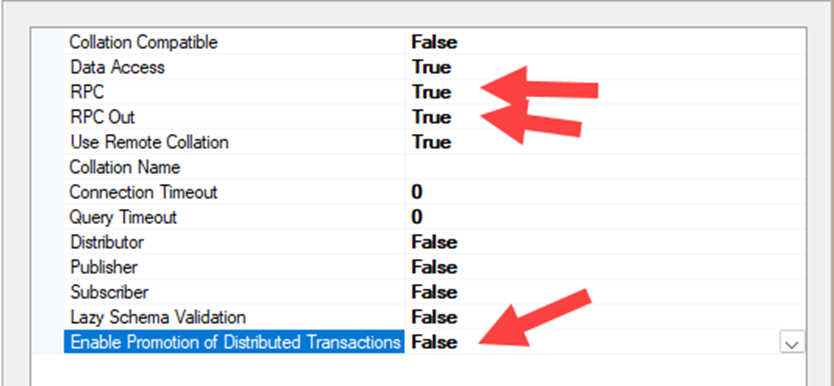
On the Server Options tab, I configured RPC and RPC Out as True and I also set the option to Enable Promotion of Distributed Transactions to False. The latter is known to cause issues for many people.
Success!
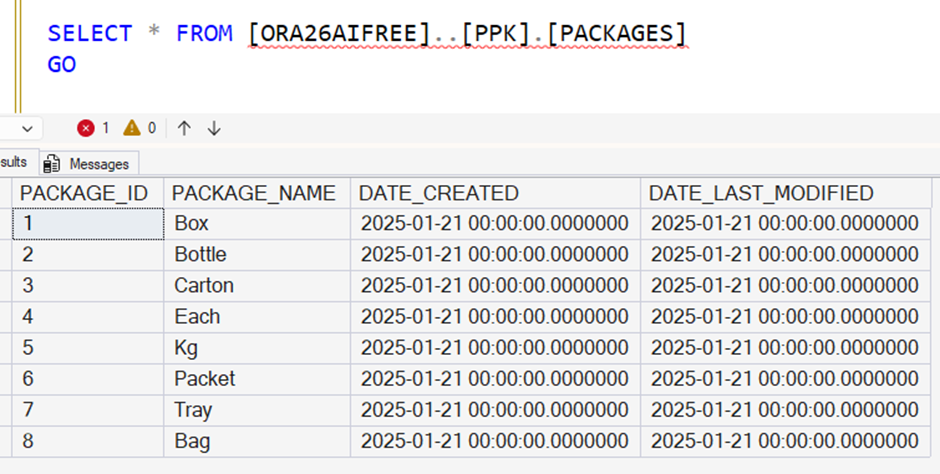
And at that point, it all worked fine as shown. I hope that helps someone else.
FAQs: How to Create a SQL Server Linked Server to Oracle 26ai Free
1. What is Oracle 26ai Free Edition?
Oracle 26ai Free Edition is Oracle’s current free database offering, similar in purpose to SQL Server Express. It replaces the older Oracle Express Edition.
2. Can SQL Server connect to Oracle 26ai Free using a linked server?
Yes. SQL Server can connect to Oracle 26ai Free using a linked server, although Oracle linked servers can be finicky and require careful configuration.
3. Why use a linked server for SQL Server to Oracle migration?
A linked server allows you to migrate data using simple INSERT SELECT statements, which is often the easiest approach when it works.
4. Which Oracle provider should be used?
You should use the OraOLEDB.Oracle provider. The old Microsoft Oracle provider should not be used.
5. What is FREEPDB1?
FREEPDB1 is the default pluggable database (PDB) created when Oracle 26ai Free is installed. Applications typically connect to this PDB rather than the container database.
6. Should I use a schema or create a new pluggable database?
The simplest option is to create a schema in FREEPDB1. Schemas can be easily moved using Oracle Data Pump (expdp and impdp).
7. Why is editing tnsnames.ora required?
SQL Server uses tnsnames.ora to resolve Oracle service names. Adding FREEPDB1 allows SQL Server to connect to the correct pluggable database.
8. What should be used as the linked server data source?
The data source should be the Oracle service name of the PDB, such as FREEPDB1.
9. Why is a fixed security context required?
Oracle linked servers do not support flowing Windows credentials, so a fixed Oracle username and password must be used.
10. Which linked server options matter?
Enable RPC and RPC Out, and disable promotion of distributed transactions.
This document contains proprietary information and is protected by copyright law.
Copyright © 2026 Red Gate Software Limited. All rights reserved






Load comments